TABLE OF CONTENTS
- Workflow Asset Lifecycle – From Request to Ready-to-Use
- DAM Asset Lifecycle – From Upload to Self-Serve
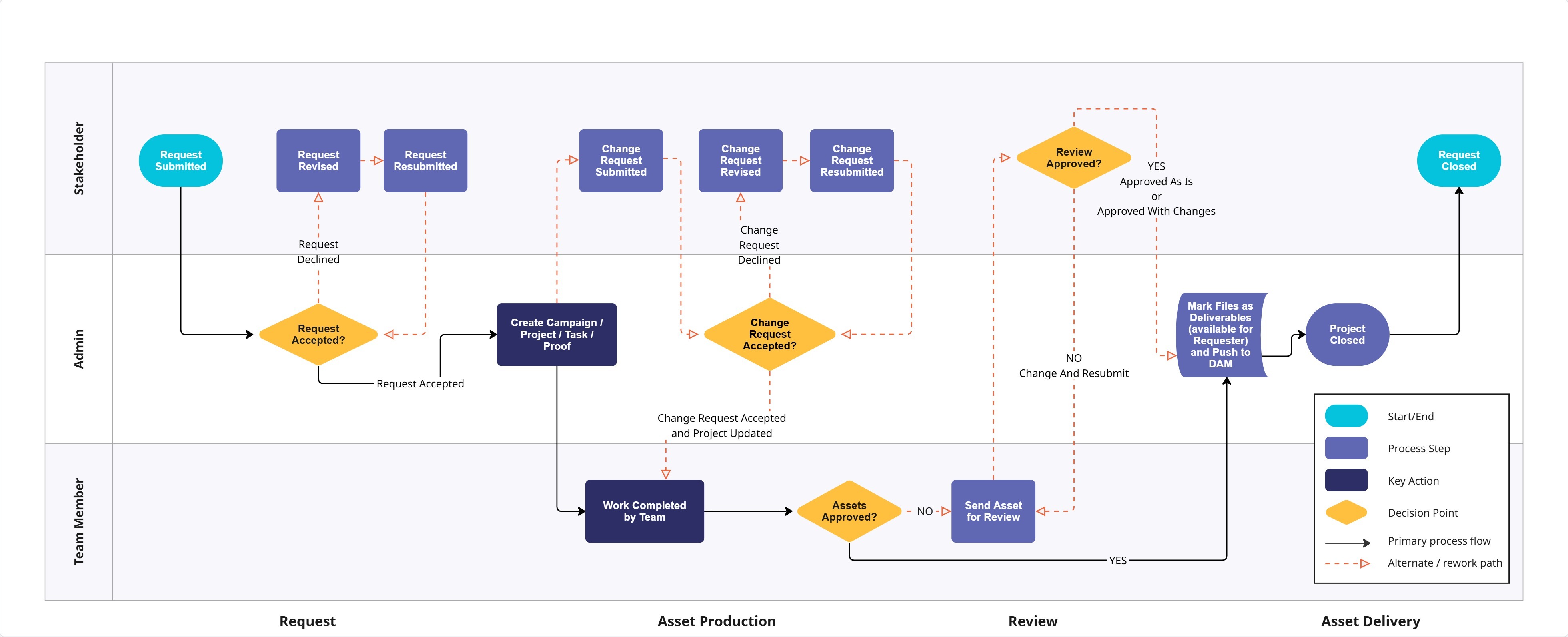
Workflow Asset Lifecycle – From Request to Ready-to-Use
This flowchart shows a simplified “happy path” for how an asset can move through Lytho Workflow—from request submission through production, review, and final delivery. It highlights typical responsibilities for Stakeholders, Admins, and Team Members so you can see how work might flow between roles.
Every organization configures Workflow a bit differently, so think of this as a starting template, not a rule. Use it to spark conversation with your team about where your process is the same, where it’s different, and how you want to tailor Lytho to match the way you work.
DAM Asset Lifecycle – From Upload to Self-Serve
This flowchart outlines a standard example of what happens to an asset once it reaches your Lytho DAM. It begins at upload, shows how assets move through the Waiting Room for review and metadata, and then how they’re published and made available for self-service via search, plugins, collections, and share links.
Because each account can use different permissions, metadata rules, and governance policies, this is meant to be a reference model rather than a prescription. Use it as a guide to design how assets should be reviewed, organized, and shared in your own DAM so stakeholders and external users can reliably find the right, on-brand files.
