Assets, Collections, Brand Guides, Publications, and Requests for Uploads can be shared from Lytho DAM with people who have and do not have access. Availability is dependent on authorization and restrictions.
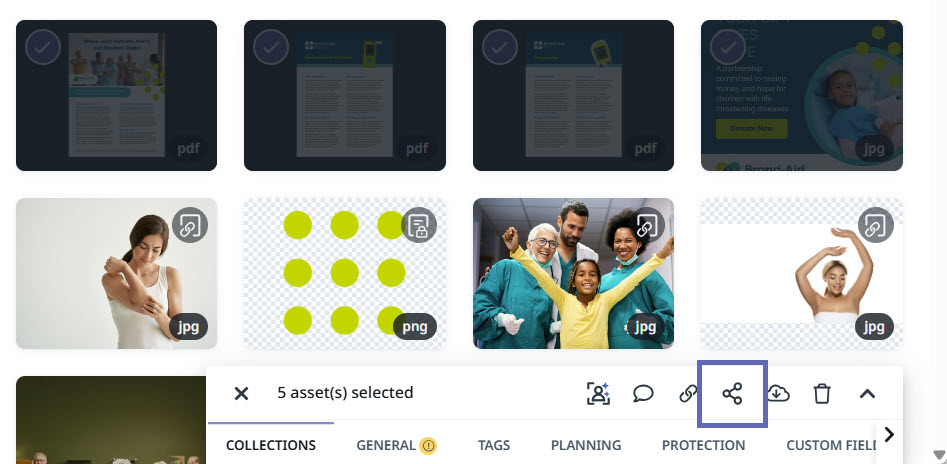
Sharing Assets, Collections, Brand Guides, Publications, and Requests for Uploads all work in a similar way. Look for the share button when asset(s) are selected and adjust settings based on your share preferences. A unique link will be created to enable distribution.
You can manage all your Share Links from your Settings page.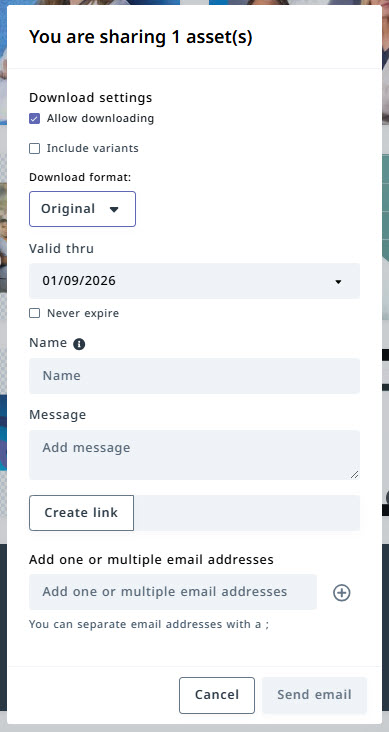
Allow downloading: Enabled by default. When enabled, recipients can download any shared attachments. Disable this option to prevent downloads.
Include variants: Disabled by default. When enabled, recipients can view all Variants associated with the shared Asset. Enable this option to automatically include Variants in the Share Link.
Valid thru: Set the expiration date for the Share Link. After the selected date, the link will automatically deactivate and no longer be accessible.
Name: Update the internal name of the Share Link. This name is only visible to your team and helps you track and manage shared links.
Message: Add a custom message for recipients when sending the Share Link via email.
Create link: Generate and copy a Share Link that can be distributed manually.
Add one or multiple email addresses: Send the Share Link directly from Lytho DAM. Enter one or more email addresses, then select Send email to deliver the shared resources.